Customize: Fantasy Couture Costume Design Sheets
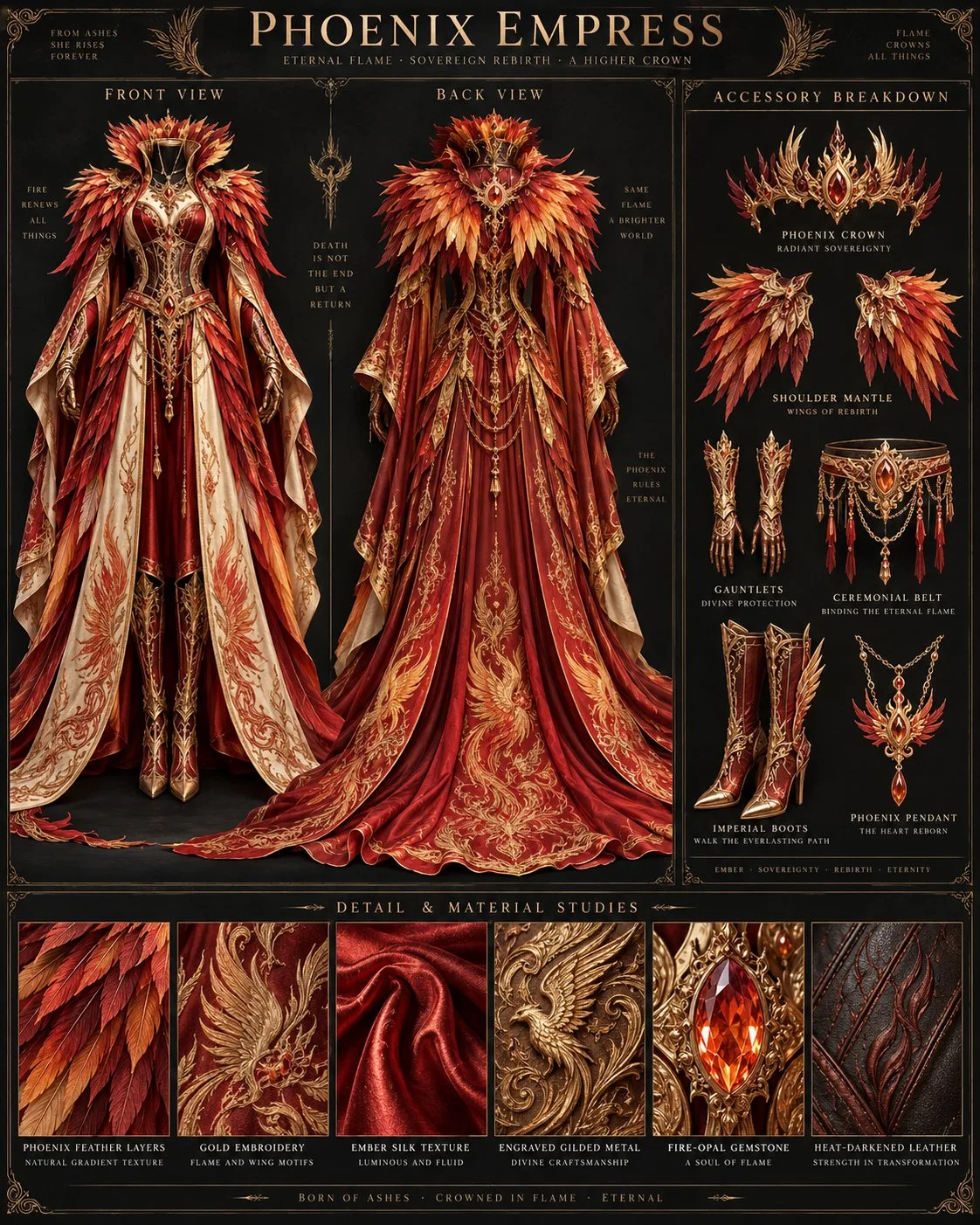
Prompt by @UNIPDEV. The image shows the original example.
Make it yours
Change the text fields below, or leave them blank to keep the original. They fill the highlighted parts of the prompt.
Reference images
Copy the prompt and attach your own reference images in your generation tool. Follow the requirements below and match any image labels to the prompt. No image upload is needed on UNIP.
Author’s instructions · English
Create a professional fantasy couture costume design sheet.
IMPORTANT:
This is NOT a character portrait.
Do NOT show:
- any person
- any human body
- any face
- any skin
- any model wearing the costume
The subject is ONLY the costume itself.
---
THEME:
[INSERT THEME]
ROLE:
[INSERT ROLE]
MOOD:
[INSERT MOOD]
STYLE:
[INSERT STYLE]
POWER LEVEL:
[INSERT POWER LEVEL]
---
DESIGN INTERPRETATION:
Automatically analyze the theme and create a complete fantasy couture costume system.
Based on the theme, intelligently determine:
- cultural and mythological references
- symbolic elements
- character identity
- visual silhouette
- costume structure
- materials
- color palette
- accessories
- decorative patterns
- functional details
The costume should communicate the identity of the theme immediately without requiring explanation.
Every design choice must support the theme.
Avoid random fantasy decoration.
---
COSTUME DESIGN:
Create a complete wearable costume based on the theme.
Automatically design:
- primary garment silhouette
- outer layer structure
- shoulder design
- collar design
- sleeve construction
- waist structure
- lower garment design
- cape, mantle, armor, robe, or ceremonial elements when appropriate
- footwear design
The costume should feel like a professionally designed outfit from a high-end fantasy universe.
The design should balance:
- beauty
- functionality
- symbolism
- cultural inspiration
- fantasy imagination
---
MATERIAL DESIGN:
Automatically select materials that naturally match the theme.
Consider:
- mythology
- environment
- creature identity
- social status
- power level
- emotional atmosphere
Combine realistic luxury materials such as:
- fabrics
- leather
- feathers
- fur
- metal
- gemstones
- crystals
- organic materials
Each material should have a clear purpose and relationship with the theme.
---
COLOR SYSTEM:
Automatically create a sophisticated fantasy color palette.
Choose:
- primary color
- secondary color
- accent color
- metallic details
The color system should reinforce:
- identity
- emotion
- mythology
- power level
---
ACCESSORY SYSTEM:
Design a complete accessory collection related to the theme.
Automatically include appropriate:
- headpiece / crown / mask
- shoulder piece
- gloves
- belt
- boots
- jewelry
- symbolic objects
Each accessory should feel like part of the same costume system.
Avoid unnecessary accessories.
---
PRESENTATION LAYOUT:
Create a luxury fantasy costume archive board.
Show:
1. FRONT VIEW
A complete front view of the costume.
Show:
- full silhouette
- garment structure
- layers
- materials
- construction details
2. BACK VIEW
Show:
- rear silhouette
- hidden construction
- cape or mantle design
- back ornamentation
3. ACCESSORY BREAKDOWN
Display isolated costume components:
- head accessory
- shoulder element
- gloves
- belt
- boots
- jewelry
- symbolic objects
4. DETAIL & MATERIAL STUDIES
Create six close-up panels showing the most important design elements.
Automatically choose details according to the theme.
Examples:
- fabric texture
- embroidery
- armor surface
- feathers
- fur
- scales
- crystal
- gemstone setting
- metal engraving
- organic materials
---
STYLE:
Luxury fantasy couture archive.
Professional costume designer presentation.
High-end fashion design board.
Dark elegant background.
Minimal sophisticated typography.
Ultra detailed realistic materials.
Premium fantasy worldbuilding.
Editorial fashion quality.
Sharp focus.
Highly refined craftsmanship.
---
NEGATIVE:
No character.
No person.
No face.
No portrait.
No model.
No cinematic scene.
No environment story.
Only the costume design.
Only the highlighted parts change. Your edits stay on this page.